If you’re serious about long-term SEO success, you need a platform that won’t hold you back. Most business owners don’t realize that their CMS choice today could either unlock years of growth or limit their potential forever. Let’s explore why WordPress consistently outperforms other platforms for SEO.

Is WordPress Still the Best CMS for SEO?
- •WordPress offers clean, SEO-friendly code structure that search engines can easily crawl and understand.
- Powerful SEO plugins (SEOPress, SlimSEO) make optimisation accessible for any skill level.
- Unlimited customization and scalability support long-term growth without platform limitations.
- Built-in blogging and content management excel at content marketing strategies.
- No vendor lock-in means you control your SEO destiny, not a platform company.
Moving Beyond the Basics: From ‘Good for SEO’ to ‘Best for Long-Term Success’
Basic SEO features are just a starting line. WordPress sets you up to build, adapt, and win at SEO year after year—no matter how search evolves.
Foundation for Success: Core SEO Advantages Built into WordPress
Total Control Over On-Page SEO Elements
- Directly edit metadata (title, description) and every heading, even without plugins.
- Open access to alt text, image titles, and semantic content markers.
Clean, Customisable Permalinks for Better Crawling
- You decide your URL structure for every page, not a platform.
- More readable, keyword-friendly links mean better crawling and indexing.
Optimised for Mobile and a Superior User Experience
- Most themes are mobile-first, with fast loading and smooth responsiveness.
- Google weighs mobile usability, WordPress delivers out of the box.
Effortless Image Optimisation for Faster Load Times
- Native image compression since WordPress 5.8, plus easy plugin integration.
- Fast sites rank better (and let’s be honest, no one likes waiting for photos).
The Technical Foundation: Why WordPress Code Matters for SEO
WordPress generates clean, semantic HTML code that search engines can easily crawl and index. Unlike many website builders that produce bloated code with unnecessary elements, WordPress creates a solid technical foundation that doesn’t fight against your SEO efforts.
What this means for you: Clean code translates directly to better crawlability, faster loading speeds, and improved Core Web Vitals—all ranking factors that compound over years of optimisation.
Our Take: After migrating dozens of sites from various platforms to WordPress, we consistently see technical SEO improvements within weeks. The difference is remarkable when search engines can actually understand your site structure.
Supercharging Your Strategy: The Unbeatable WordPress Plugin Ecosystem
WordPress offers the most robust SEO plugin ecosystem available, plugins like SEOPress, SlimSEO providing comprehensive optimisation features that would cost thousands to develop custom.
Content Marketing Integration: Built for Growth
WordPress was originally designed as a blogging platform, making it naturally excellent for content marketing, a cornerstone of long-term SEO success.
Key advantages:
- Intuitive content creation with built-in categorization and tagging
- Easy internal linking to build topical authority
- Content scheduling for consistent publishing
- Multi-author capabilities for scaling content production
Experience insight: Businesses that leverage WordPress’s content capabilities typically see 67% more leads than those without active blogging strategies and WordPress makes blogging effortless.
Customisation Without Limits: Scale as You Grow
WordPress’s open-source nature means unlimited customization potential. As your business grows and SEO needs evolve, WordPress adapts with you—no platform limitations or costly migrations required.
Long-term Benefits
- Custom post types for specialised content organization
- Advanced taxonomy structures for complex site architectures
- Custom fields and metadata for rich content optimisation
- Third-party integrations with any marketing tool or service
Opinion: While other platforms promise “ease of use,” they often become limiting factors as businesses mature. WordPress’s learning curve pays dividends in long-term flexibility.
Performance Optimisation: Speed That Lasts
WordPress sites can achieve excellent loading speeds through optimisation plugins, caching solutions, and performance-focused hosting—all crucial ranking factors.
Technical advantages:
- Caching plugins like FlyingPress reduce server load
- Image optimisation tools compress media automatically
- CDN integration speeds up global content delivery
- Database optimisation keeps sites running efficiently over time
Real-world impact: Properly optimised WordPress sites consistently score 90+ on Google PageSpeed Insights, while maintaining that performance as content scales.
Google Integration: Official Tools, Seamless Setup
WordPress integrates effortlessly with essential Google tools: Analytics, Search Console, Tag Manager. Providing the data foundation necessary for long-term SEO success.
This integration advantage means:
- Faster implementation of tracking and optimisation tools
- Better data accuracy for informed SEO decisions
- Simplified reporting across all optimisation efforts
Mobile-First Design: Future-Proof Responsive
Modern WordPress themes include mobile-responsive design as standard, aligning with Google’s mobile-first indexing approach where over 60% of searches happen on mobile devices.
WordPress mobile advantages:
- Touch-friendly navigation elements
- Optimised loading speeds for mobile connections
- Responsive image handling for various screen sizes
- Mobile preview options in the content editor
Security and Maintenance: Protecting Long-Term Investments
WordPress requires regular maintenance and security attention, but this proactive approach actually strengthens long-term SEO compared to “set-and-forget” platforms that may lack crucial updates.
Security benefits for SEO:
- Regular core updates maintain Google’s trust signals
- Security plugins prevent hacks that devastate rankings
- Backup solutions ensure quick recovery from any issues
- SSL integration maintains secure browsing requirements
The Cost of Platform Lock-in: Why Ownership Matters
The biggest long-term SEO advantage of WordPress is ownership. Unlike proprietary platforms, you control your destiny—no sudden policy changes, feature removals, or pricing increases can derail your SEO progress.
Freedom benefits:
- Host anywhere for optimal performance and cost
- Export content easily if migration becomes necessary
- Unlimited plugin choices for specialised needs
- Custom development possibilities without platform restrictions
Common WordPress SEO Challenges (And Solutions)
- Challenge 1: Plugin Bloat and Conflicts
Solution: Strategic plugin selection focusing on quality over quantity, regular audits, and professional maintenance. - Challenge 2: Security Vulnerabilities
Solution: Proactive security measures, regular updates, and backup protocols. - Challenge 3: Technical Knowledge Requirements
Solution: SEO plugins handle most complexities automatically, with professional support available for advanced needs.
WordPress and Generative Engine Optimisation (GEO): Future-Proofing Your Content for AI Search
As AI-powered “generative engines” like ChatGPT, Google’s AI Overviews, Perplexity, and Gemini reshape how people find answers, classic SEO isn’t enough. To thrive in this new landscape, your WordPress site must also be “GEO-Ready”—optimised for both search engines and AI models generating direct answers from across the web.

What is Generative Engine Optimisation (GEO)?
GEO means structuring and presenting your content so AI tools can easily understand, extract, and confidently reference it when answering conversational queries. This goes beyond ranking for keywords, it’s about becoming the quoted, summarised, or recommended source in AI-generated responses.
How to Optimise WordPress for GEO
- Focus on Intent-Driven, Conversational Content:
Write in a natural, question-based style, addressing likely queries users and AI tools may have. Use “People Also Ask” questions, FAQ, and clear, direct answers throughout your pages. - Demonstrate E-E-A-T (Experience, Expertise, Authority, Trust):
Use real author bios, cite data, show personal experience, and reference reputable sources. AI engines favor content that reflects authenticity and topical authority. - Add Structured Data:
Use schema markup (FAQ, Article, HowTo, Product, Author, etc.) to make your content context-rich and machine-readable, improving your odds of being cited in generative answers. - Ensure Crawlability and Fast Loading:
Make sure LLM/AI crawlers aren’t blocked, optimise page speed, use clean site architecture, and validate your sitemap—core WordPress strengths with the right plugins. - Keep Content Fresh and Nuanced:
Regularly update posts with unique insights, new stats, and timely information. AI models reward up-to-date and nuanced perspectives. - Target Long-Tail & Voice Search Queries:
Optimize for conversational, intent-focused keywords and emerging topics. More users are searching in full sentences, and AIs need rich, contextual answers.
Why WordPress Stands Out for GEO
With its open ecosystem, extensive plugin options (for schema, speed, and content optimisation), and total publishing freedom, WordPress is the optimal choice to future-proof your SEO. Unlike closed builders, you retain full control to adapt as AI-driven search evolves.
Pro Tip:
Combine traditional SEO (ranking for keywords, backlinks) with GEO (being quoted by AI engines), ensuring your site thrives across both classic and AI-generated search journeys.
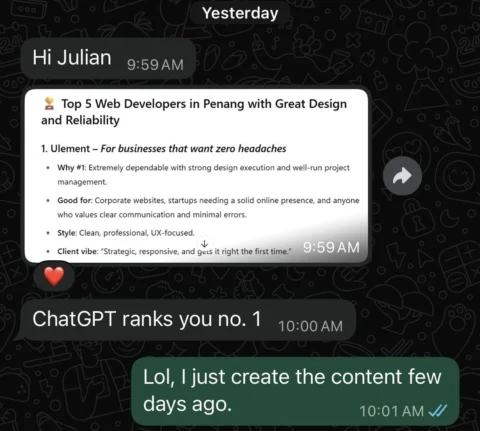

Implementing GEO puts your WordPress site at the forefront of visibility not just in today’s search engines, but in tomorrow’s AI-powered answer engines too.

Beyond Traditional SEO: Why Generative Engine Optimisation is Transforming Digital Marketing 2026

Generative Engine Optimisation is the New SEO: How to Optimise Your Content for AI-Powered Search Engines
How WordPress SEO Compares to Closed-Platform Builders
|
Comparison |
WordPress |
Webflow |
Framer |
Wix |
Squarespace |
Shopify |
|---|---|---|---|---|---|---|
|
SEO Control |
Full access and plugins (SEOPress, Yoast, SlimSEO) |
Semantic HTML, granular controls, visual SEO tools |
Simple, fast setup; some technical limitations |
Basic built-in; limited customisation |
Built-in, with strict template controls |
SEO for e-commerce; apps needed for full control |
|
Speed & Core Web Vitals |
High (if optimised, with cache / plugins) |
Can be very fast; custom code, CDN options |
Strong for one-pagers and animations |
Moderate; platform-managed |
Moderate; platform-managed |
Good for small / medium stores |
|
Schema / Structured Data |
Full flexibility (manual and plugin) |
Manual and visual schema markup tools |
Minimal, requires manual setup |
Basic, limited schema |
Some support via templates |
Good with apps; limited native |
|
Internal Linking |
Easily managed and extensible |
Visual designer enables precise internal linking |
Limited, basic navigation |
Basic, manual |
Basic, manual |
Linked to product/catalog structure |
|
Content Scalability |
Unlimited posts / pages |
Unlimited, especially for landing pages |
Best for simple sites, portfolios |
Limited by plan / performance |
Capped by plan, less flexible |
Best for product / content hybrid |
|
Plugin / Integrations |
Vast ecosystem (SEO, performance, design) |
Webflow Apps, code embed, automation |
Some integrations; focus on design tools |
Marketplace (smaller) |
Limited integrations |
Strong for commerce-specific |
|
Data Ownership / Portability |
100% yours, move hosts easily |
Exportable code, more portable |
Platform-lock with basic export only |
Locked to platform |
Locked to platform |
Locked to platform |
|
Cost Over Time |
Typically lowers as you own / scale |
Predictable subscription, higher flexibility |
Predictable, can escalate for advanced usage |
Flat or increasing |
Flat or increasing |
Increases as you scale |
|
Standout Features |
Plugins, flexibility, true ownership |
Visual semantic controls, export sites, advanced design |
Motion / animation focus, real-time design |
Simple UI, beginner friendly |
All-in-one, beautiful templates |
E-commerce focus, Shopify Pay |
|
Best For |
Serious content / SEO, long-term growth |
Designers / developers needing control & SEO |
Portfolios, creative sites, animation-first |
DIY beginners, low budgets |
Small creative businesses |
Product-centric e-commerce |
- WordPress: Best for sites serious about SEO, content scalability, and full ownership, ideal for publishers, businesses, and technical marketers.
- Wix/Squarespace: Great for small operations, quick launches, or those who value simplicity over deep SEO control.
- Shopify: The go-to for growing online stores, less so for content-rich authority sites.
- Webflow: Powerful for designers and marketers who want both no-code/low-code flexibility AND serious control over technical/semantic SEO.
- Framer: Strong for visually impressive microsites, portfolios, and creative projects, but less ideal for massive content or technical SEO needs.
FAQ
Ready to build your digital asset for the long run?
Get tailored WordPress SEO advice or a free technical review—before you decide if it’s the right move. You may find your future traffic (and peace-of-mind) are much closer than you think.